

ODM Ergonomic Office Chair Features That Boost Comfort and Productivity
2026-10-02
Most office chairs promise comfort, but few deliver the kind of ergonomic engineering that actually changes how you feel at the end of a workday. ODM ergonomic office chairs stand out by combining adjustable lumbar support, breathable mesh, and seat depth settings that adapt to your body—not the other way around. These features do more than reduce back pain; they keep you alert and productive through long meetings and tight deadlines. Curious which upgrades matter most? We’ve used feedback from OFCJNS and real-world testing to highlight the ODM chair features that genuinely boost comfort and output.
The Lumbar Curve Most Chairs Get Wrong
Most chairs seem to think the lumbar curve is a single, static bulge that needs to be jammed into your lower back. They sew a thick foam ridge into the backrest at belt height and call it support. But the natural lordosis is not a knot—it is a long, shallow arc that shifts as you lean forward, recline, or reach for a keyboard. When a chair forces one pronounced curve into a single spot, it often flattens the surrounding vertebrae and leaves you slouching just to get comfortable.
The bigger mistake is overbuilding the support. A lumbar pad that protrudes too far can tilt the pelvis backward and round the lower spine, which is the opposite of what healthy sitting looks like. Instead of resting into the chair, you end up bracing against it. After an hour, that subtle fight shows up as tightness across the low back and a creeping slump in the shoulders.
What actually works is a gentle, height-adjustable contact that follows the natural sweep of the spine without exaggerating it. It should feel like an open palm resting lightly at the small of the back, not a fist pressing into one joint. When the support is quiet enough to forget, the back can finally hold its own curve.
Why Seat Depth Matters More Than Lumbar
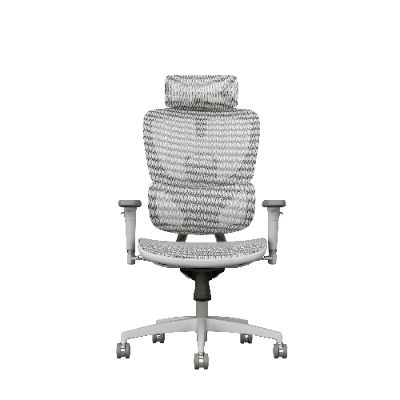
Most people assume a prominent lumbar bump is the key to back comfort, but that ignores where the real load lands. Seat depth dictates whether your thighs are fully supported or left dangling, which shifts pressure to your sit bones and lower spine. If the pan is too deep, shorter users slide forward to reach the pedals, losing contact with the backrest entirely. Too shallow, and only the edge of the cushion carries your weight, creating a sharp line of compression behind the knees.
That forward slide is where lumbar support becomes irrelevant. A large lumbar pad can't do its job if your back never touches it. Depth, on the other hand, controls how your pelvis rotates and whether your hip angle stays open or collapses. A well-matched depth lets your knees drop slightly below your hips, anchoring you without pressure points. Once that base is right, a modest lumbar curve often feels like a bonus rather than a requirement.
Chasing more lumbar adjustment to fix a depth problem usually just pushes your lower back into an exaggerated arch. The better path is to get the seat pan length right first, then fine-tune lumbar if needed. In ergonomic chairs, depth adjustments almost always change perceived comfort more than lumbar tension dials because they address the structure under the entire sitting posture.
Mesh Backs That Don’t Turn Into Sweat Traps
The mesh panel isn't just a style choice. On long days, a tightly woven backrest traps heat against your spine, and by mid-afternoon your shirt is damp. A properly vented mesh back lets air move through the chair even when you're pressed against it. You'll notice the difference after the first hour, not after reading a spec sheet.
Look for wider gaps in the weave near the lower back, where heat builds up fastest. Some chairs add a slight curve to the frame so the mesh stays taut without digging in. If the material feels slick or clingy when you run a hand over it, it'll likely hold moisture instead of releasing it. Good mesh dries fast and stays cool to the touch.
Cheap mesh can sag after a few months and lose that breathability. Reinforced edges and a firm suspension keep the fabric from stretching into a pocket that collects sweat. Test the chair in a warm room if you can. If your back still feels dry after twenty minutes, the mesh is doing its job.
Armrests Built for Typing, Not Just Resting
Most armrests feel like an afterthought—a flat pad meant to catch your elbows during a pause. But when your hands hover over the keyboard for hours, those static supports do little to keep your wrists aligned or your shoulders relaxed. The design here flips that logic. Instead of a passive shelf, the armrests are shaped to follow the natural inward angle of your forearms as you type, keeping your elbows close and your fingers reaching the keys without stretching. A subtle contour cradles the lower arm just behind the wrist, so you get steady leverage without pressing on the carpal tunnel or cutting off circulation.
The surface is firm enough to hold its shape under weight, yet has a slight give that prevents pressure points from forming. Unlike plush pads that sink over time, this material stays consistent through month after month of daily use. The front edge is rounded rather than squared off, so you can rest your palms on it while your fingers dance across the home row without any hard ridge digging into your skin. And because the armrests attach to the chair rather than the desk, the support moves with you when you swivel or lean back, keeping the same typing angle whether you are drafting an email or leaning into a spreadsheet.
Setting them up takes a few seconds—just adjust the height so your elbows bend at roughly ninety degrees and your wrists stay flat. From there, typing feels less like fighting gravity and more like your arms are being held in a ready position by a pair of invisible hands. It is a small change that makes a noticeable difference after the first long writing session.
A Recline That Feels Like Floating, Not Falling
The first thing you notice is the absence of that stomach-dropping lurch. Instead of hinging back in one abrupt motion, the chair tilts through a controlled arc, your weight redistributing so gradually that your inner ear never sounds an alarm. It's the difference between being dropped and being caught by a slow current—each degree of recline arrives with a quiet assurance that you won't overshoot into freefall.
Part of the secret is in how the backrest and seat move together. Rather than leaving your legs behind while your torso swings rearward, the entire support surface shifts as a single, fluid unit. Your hips stay aligned, your knees rise just enough to release pressure from your lower spine, and your head settles into a position that feels less like surrender and more like suspension. The frame's counterbalance does the work you'd normally brace for.
Over time, that floating sensation becomes something you seek out—not just a feature but a brief escape from gravity's usual demands. You lean back without checking the mechanism, trusting the arc to hold you in a place where tension unwinds on its own. It's the rare recline that invites you to stop thinking about how you're sitting and start noticing how light you can feel.
ODM Tweaks That Fix Open-Office Discomfort
Most open-office discomfort doesn't come from the desk itself—it comes from how the space was tuned, or never tuned at all. Small adjustments to an ODM setup can make a surprising difference. Start with monitor height. If your screen sits too low, your neck tilts forward all day, and that stiffness becomes impossible to ignore by mid-afternoon. A simple riser or even a stack of books can bring the top of the screen to eye level, shifting the strain away from your cervical spine without buying a single new piece of furniture.
Lighting is another overlooked culprit. Overhead fluorescents cast a flat, shadowless glow that forces your eyes to work harder than they should. Adding a small desk lamp with a warm bulb, angled to wash the wall just behind your monitor, creates a gentle contrast that reduces glare on the screen and softens the room. It tricks your brain into feeling less like a warehouse and more like a workshop.
Finally, think about micro-boundaries. In an open layout, the lack of visual privacy can make your shoulders creep up toward your ears. A narrow shelf or a row of plants along the edge of your desk—nothing taller than your seated eye line—gives your peripheral vision a place to rest. You still hear the room, but you stop feeling exposed. That small psychological shift often relaxes the neck and jaw, which is where a lot of open-office pain hides.
FAQ
An ODM ergonomic chair is designed around how your body actually moves while working. Instead of a fixed backrest and one-size-fits-all cushion, it typically offers adjustable lumbar support, a seat pan that slides forward or back, and a tilt mechanism that lets you recline without leaving your feet flat. Those adjustments matter because they keep your spine in a neutral position and reduce pressure points that standard chairs ignore.
When the lumbar curve isn't supported, your lower back muscles have to work constantly to keep you upright. Adjustable support lets you place that firm but flexible pressure exactly where your spine needs it, so the muscles can relax. Over an eight-hour day, that translates to less stiffness around the belt line and fewer posture collapses where you slide forward on the seat.
It is not marketing, but you will only notice the difference if you adjust them correctly. Seat depth changes how much of your thighs are supported. Too deep and the edge digs into the back of your knees, cutting circulation; too shallow and your weight sits on a small area. The tilt mechanism lets you shift positions throughout the day, which keeps blood flowing and prevents the fatigue that makes you lose focus around mid-afternoon.
Look for a breathable mesh back or a fabric with an open weave rather than bonded leather or dense foam. Mesh allows air to move across your back and shoulders, which stops that sticky, overheated feeling. For the seat, a high-resilience foam with a fabric cover usually stays cooler than leather. Some chairs also have a suspended mesh seat, which is even better for airflow.
Yes, but only if they adjust in at least three directions: height, width, and depth. Fixed armrests often force your shoulders up or your elbows out, which leads to neck and upper back tension. Adjustable armrests let you keep your forearms parallel to the floor and close to your body, so your shoulders can stay relaxed while typing or using a mouse.
The headrest should support the base of your skull, not push your head forward. When you sit back and relax, the curve of the headrest should touch the back of your head while your ears stay aligned over your shoulders. If you have to tilt your head up or down to reach it, the chair is not adjusted for your height. A good headrest also lets you adjust both height and angle.
They can improve posture, but only if you use the adjustments actively. The chair supports a neutral spine, but it won't hold you there if you keep slouching. The real benefit is that a well-adjusted chair makes good posture the easiest option, so you gradually stop fighting gravity. Over weeks, the muscles that keep you upright get stronger because they aren't overworked, and you tend to carry that better alignment even when you stand up.
Conclusion
Most office chairs miss the mark because they treat the lower back as a one-size-fits-all problem. ODM flips that by using a lumbar curve that moves with your spine instead of jabbing a fixed plastic bar into it. Paired with that is a seat-depth adjustment many buyers ignore until it's too late. A pan that slides far enough forward keeps your thighs fully supported without cutting off circulation behind your knees, so you can sit all the way back without perching on the edge. The mesh back isn't just a sheet of fabric either. It uses varied tension zones and an open weave that lets air circulate, so a long afternoon of work doesn't leave your shirt clinging to your back.
Armrests on a lot of chairs feel like an afterthought, but ODM builds them for the way you actually type. The pads adjust in height, width, and angle, then lock firmly enough to hold your forearms level with the desk, which takes pressure off your shoulders and wrists. The recline mechanism is tuned so the seat and back move together in a smooth arc. You don't get that stomach-drop moment when leaning back; instead, the chair cradles your weight and keeps your feet grounded. In an open office, small ODM tweaks make a big difference: quieter casters, a slimmer frame that doesn't crowd walkways, and materials that cut down on squeaks and echoes. The result is a chair that supports focused work without announcing itself to the whole room.
Contact Us
Contact Person: Diff Wang
Email: [email protected]
Tel/WhatsApp: +8613650281199
Website: https://www.ofcmeshchair.com/